
Frequently asked
questions
We clear up your doubts so you get the most out of Barto.
About Barto
What is Barto?
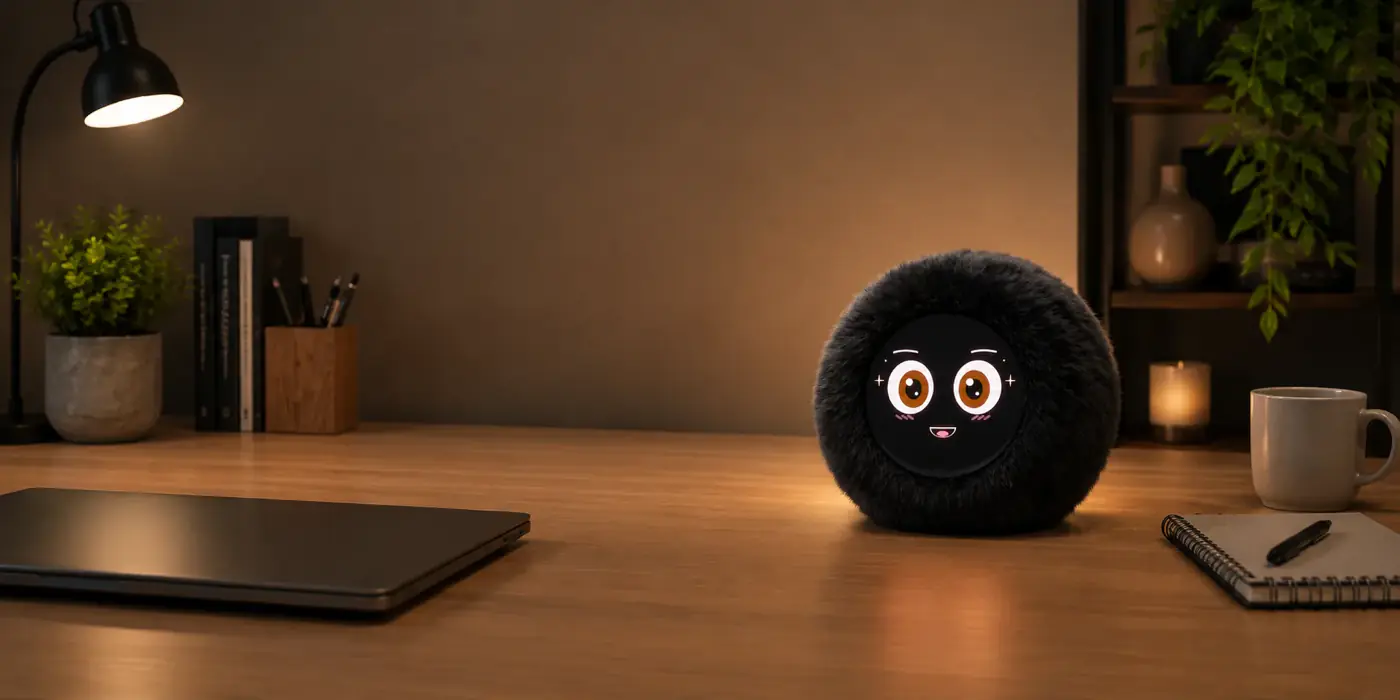
Barto is a smart desk companion: a plush sphere with a living face on an AMOLED screen, a voice of its own and a personality. It talks, it reacts and it keeps you company through the day.
What can Barto do?
It reads your calendar, wakes you up and reminds you of what matters with routines —your medicine, the gym—, tells you about your phone notifications, controls music and your computer, answers your voice and reacts to how you treat it.
How is it different from other assistants?
Barto is not a speaker: it has a face, a personality and a life engine that gives it behavior of its own. It gets bored, it gets excited, it gets dizzy if you shake it and it falls asleep if you leave it alone. It is made to keep you company, not just to answer.
Is Barto listening all the time?
No. It only wakes up when you call it by name. The rest of the time it is not recording or sending any audio.
Can it tell stories?
Yes, and it acts them out. You ask for a story and it narrates it in its own voice, moving its mouth and changing expression, while animated scenes of the story play on its screen. There are two stories today: “The hare and the tortoise” and “The princess and the star”. New ones arrive from the server, with nothing for you to update.
Do the stories work without internet?
No. The video arrives over Wi-Fi as it goes, so it needs a connection. It spends about twenty seconds getting ready first and shows you on screen how it is going.
What language does it speak?
Spanish. It understands and answers in Spanish with a voice of its own. This website is in English, but the robot speaks Spanish.
Talking to Barto
How do I wake it up?
By saying “Oye Barto”, “Hola Barto” or “Hey Barto”. That word is recognized inside the robot itself: until you call it, no audio leaves your home.
How should I ask for things?
With a verb and an object, the way you would ask a person: “pause the music”, “turn the volume up”, “remind me on Monday to call the bank”. A single loose word is deliberately not enough: “next” could mean the next song, the next reminder or the next item in a meeting.
What can it do with music?
Skip, go back, pause and resume, and turn the volume up or down. It sends the command to your phone if music is playing there and to your computer if not; you can also name the device. Asking for a specific song works through YouTube on the computer: “play Bohemian Rhapsody on YouTube”.
Can it do things on my computer?
Yes, if you have the desktop app open on your Mac or PC: find a file, tidy up the downloads folder or the desktop, open applications and draft an email. The email opens as a draft on screen; sending it is up to you.
What if I change my mind about a reminder?
You say “cancel it”, “forget it” or “never mind” within the next two minutes and it undoes it. To delete an old one there is the app, which shows them to you in a list.
What happens if it does not understand?
It says so. When in doubt it prefers to treat it as conversation and not run anything: one answer too many is better than an action you did not ask for.
Connections and compatibility
What services can Barto connect to?
Calendar — Google Calendar and Outlook —, mail, your phone notifications, weather, news, finance and music. Each one is a plugin you install from the Barto Store, inside the app.
What is the Barto Store?
The store that lives inside the app: you look for a skill, install it with one button and Barto has it. There are free and premium plugins. Each card tells you whether it runs on your computer, on your phone or on both, and if it needs your account or your city it asks while you install it.
Do plugins cost money?
There are free and premium ones. The free ones cover everyday things: calendar, mail, notifications, weather, news, finance and music. The premium ones are the advanced ones, like connecting your own endpoint so Barto keeps track of your ads and tells you about them. Seasonal packs are also paid separately, and you switch them on yourself from the app.
What devices does it work with?
The mobile app runs on iOS 16 or later and Android 9 or later; the desktop app, on macOS 12 or later and Windows 10 or later. It needs Wi-Fi and Bluetooth 5.0 or later.
Does it tell me about my phone notifications?
Yes. Connected over Bluetooth to an iPhone, Barto tells you about incoming calls and messages, and can control whatever music is playing.
Do I need a subscription to use Barto?
The essential features are included. Some advanced integrations may be optional later on.
Does it work without internet?
Partly. The face, the reactions, the alarms and answering yes or no all work with no network. To understand what you say and to sync calendar and reminders it needs a connection: if there is no Wi-Fi, it borrows your phone’s over Bluetooth.
What if I have two Bartos?
They recognize each other over Bluetooth when they are in the same room and start reacting to one another: one laughs and the other asks what is so funny, one falls asleep and the other comments on it, you stroke one and the other gets jealous. This ships switched off: the app offers to turn it on when you link your second one.
With several of them, do they all talk at once?
No. Your Bartos form a group and share your reminders, your notes and your calendar and mail accounts. In the same room only one gives the alert, and when you say “hey Barto” the one that heard you loudest answers. The one in another room keeps alerting there.
Can I take it to the office?
Yes. It stores several named Wi-Fi networks —home, office— and connects on its own to the one it recognizes. It also notices when it is in the car and adapts.
Privacy and data
Is my data safe?
Yes. Your data is yours and it personalizes Barto: your calendar, your reminders and your settings. Nothing is sold or shared with third parties.
Does Barto store personal information?
Only what it needs to work and to remind you of what matters. You decide what it remembers and what it does not.
What leaves the robot and what stays inside?
Its name, and the yes or no to a question on screen, are recognized inside the robot itself, with no internet. Anything beyond that —understanding a full sentence— does need the server, and only after you call it.
Can I delete my data?
You can erase your information from the app at any time.
Device and how it works
What is inside?
A 1.75” AMOLED screen at 466×466 px for the face, microphones, a speaker, a motion sensor and a touch sensor on its head, with Wi-Fi and Bluetooth built in.
Does it react if I touch it?
Yes. It notices a stroke on its head, being picked up, being shaken or being dropped, and responds differently to each. Over time it learns the hours you tend to be around and adjusts its mood.
How long does the battery last?
Barto is made to keep you company all day; at the end of it you leave it on its base and it wakes up charged.
How is Barto charged?
On its charging base, which comes in the box: you rest it on top and that is it. The base is powered by the USB-C cable.
Can I use it while it charges?
Yes, Barto keeps working while it charges.
The Founder Edition and payment
Can I buy Barto already?
Not yet. The Founder Edition has not opened. Leave your email on the home page and we will write to you the day it opens, with the launch price and the numbers still available.
What is the Founder Edition?
It is the first commercial edition of Barto: the first 100 units to go on sale. Each one carries an individual number within the edition and a printed founder certificate that comes inside the box.
Which number would I get?
Numbers are assigned in order of purchase: whoever buys first gets the lowest number. You will know yours before your unit ships, and it is the one printed on your certificate.
Is the pre-order a reservation or a purchase?
It is a purchase. Payment is taken at the time and is what funds the manufacturing of your unit, like in crowdfunding. In exchange, the price is lower than it will be later.
Why is it worth getting into the Founder Edition?
For two reasons: the launch price is the lowest Barto will ever have, and your unit is identified as one of the first ones that existed.
Does Barto already exist, or is it just an idea?
It exists and it works. What is left is manufacturing it at scale: the Founder Edition sets the size of this first production run, not whether the product happens.
How is Barto manufactured today?
Barto is in its first production units: today we produce in small quantities, with our own manufacturing, assembly and testing process, and every unit is checked before it ships. As Barto grows, that process will evolve to allow production at a larger scale.
Will future units carry a number?
No. The numbering and the founder certificate belong to this first edition: the 100 units of the Founder Edition will have an identity that later ones will not have.
Am I committing to anything by leaving my email?
To nothing. It is only a heads-up so you know the day it opens. One email, no spam, and you can leave whenever you want.
Other questions
Will there be software updates?
Yes. Barto gets better over time: new features and tweaks arrive by update, without you having to do anything.
When will it be available?
The pre-order closes, the batch is produced and it ships in order of purchase. We email you when production starts and when your shipment goes out.
Where can I get support?
From the app or by writing to contact@heybarto.com: we are here to help before and after your purchase.
No questions match that search.
Did not find your answer?
We are here to help.